

iTop VPN Review 2026: Budget Windows VPN With Extras, But Weak Trust
- Good For: Windows users seeking a simple, free or low cost VPN with gaming/streaming servers and built in extras like ad blocking and system security scans. Offers torrent/P2P support and even a free static IP feature.
- Avoid If: You need rock solid privacy, no audits, reliable Netflix/Hulu unblocking, or use non Windows platforms. The kill switch can fail, and iOS/Android apps lack many core features. Not ideal for evading strict censorship e.g. China or corporate environments.
- Security: Claims AES 256 encryption, but uses proprietary protocols and a custom HTTPS tunnel via WinDivert. No WireGuard or IKEv2. The Windows kill switch often works, but TechRadar found it fails on abrupt disconnects. Leak protection is strong by default with no DNS/IP/WebRTC leaks observed.
- Privacy: Based in Hong Kong, outside the Five Eyes, but under China’s National Security Law. Advertises a no logs policy, yet lacks transparency no audits or transparency reports and an opaque policy free tier data caps imply some logging.
- Overall: iTop VPN is a budget friendly Windows VPN with a generous free tier and extra features. It works adequately for casual streaming BBC iPlayer, Disney+ and torrenting, but its security and privacy posture is weaker than top tier VPNs. For critical privacy or heavy Netflix usage, proven alternatives with audited protocols and jurisdictional advantages are safer choices.
iTop VPN is a freemium Windows centric VPN from iTop Inc. Orange View Ltd of Hong Kong. It targets budget conscious users and gamers by bundling a VPN with utilities like system boosting tools and a screen recorder. Many consider iTop for its free tier with 700 MB/day data and claimed features like split tunneling, static IP, and military grade encryption. However, marketing claims can be misleading. This review digs into technical security, privacy, and performance, not slogans assessing iTop’s encryption, protocols, leak protection, and trustworthiness based on tests and third party analysis.
How Secure Is iTop VPN?
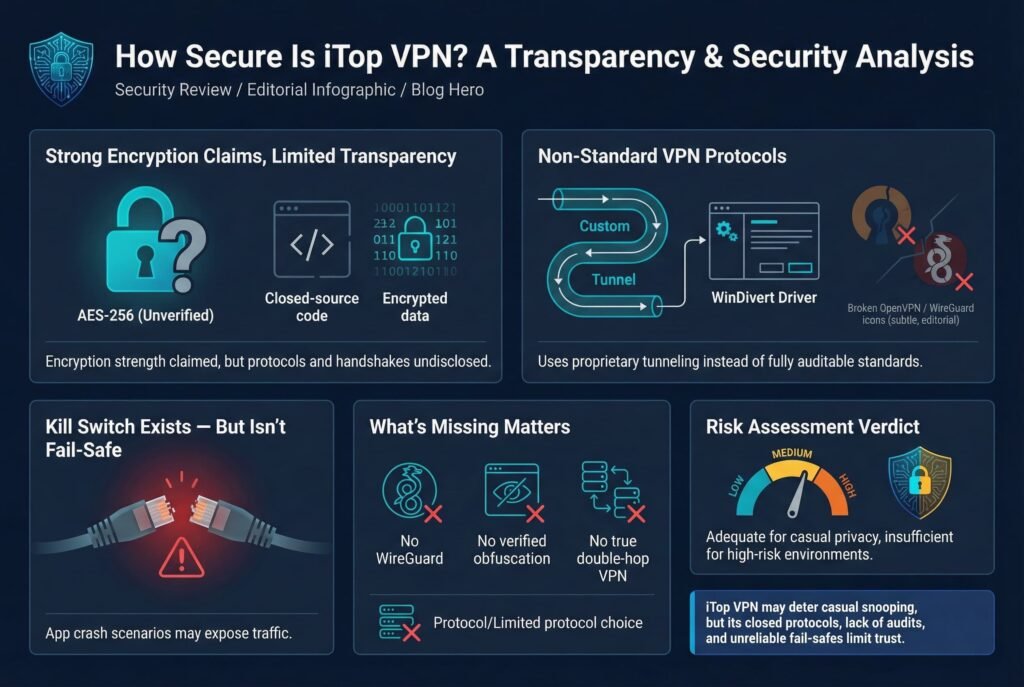
On paper, iTop touts AES 256 encryption and a kill switch. In practice, the details are murky. The Windows app lets you choose among Auto, TCP, UDP, or HTTPS Double Encryption modes, but the underlying protocols are proprietary. In a TechRadar deep dive, analysts observed iTop’s Windows client using a custom tunneling method via the open source WinDivert driver rather than standard OpenVPN/HTTPS stacks. In short, iTop has not disclosed its cipher suites or handshakes, and you can’t audit them. As TechRadar warns, iTop VPN doesn’t use any standard VPN protocol, so it’s not completely clear what the effects of these settings might be.
In iTop’s Windows client, the protocol menu offers Auto recommended, TCP privacy, UDP speed, and an HTTPS Double Encryption mode see screenshot. However, since iTop doesn’t specify how these work, we must treat them skeptically. The HTTPS option likely uses port 443 to evade blocks, but it is not WireGuard or genuine double VPN by itself. Notably, iTop’s own site and documentation make vague references to OpenVPN and an SSL/HTTPS mode, but provide no technical audit.
Overall, encryption strength may be AES 256 as claimed when properly implemented, but the implementation is closed source. We found no independent verification or published audits. By contrast, top VPNs publish their algorithms e.g. NordVPN’s AES‑256‑GCM protocol suite with ChaCha20 based NordLynx is openly documented and audited. With iTop, we have to trust the company’s word. On balance, iTop’s encryption is likely adequate against casual snooping, but its security rating must be tempered by the lack of transparency.
Protocol Support
- OpenVPN: The Windows app appears to use variants of OpenVPN over UDP/TCP, the TCP and UDP modes under the hood. The Android/iOS apps default to UDP with no user choice. There is no explicit WireGuard or IKEv2 option. According to vpnMentor, there is hope for WireGuard or obfuscation in the future, but currently the protocol list is limited.
- Proprietary HTTPS mode: iTop’s HTTPS Double Encryption setting likely wraps VPN traffic in an SSL channel to bypass firewalls. TechRadar confirms it uses WinDivert for this tunnel. It may help in restrictive networks, but it’s not a standard audited method.
- No obfuscation/double hop: Despite marketing banners touting Double VPN on the website, reviewers found no real double hop feature active. The feature page claims you can connect through 2 servers, but in the apps this isn’t seen. There’s also no reference to obfuscation beyond the HTTPS mode. In practice, if you need strong obfuscation e.g. for China, iTop doesn’t deliver support confirming it does not work in China.
Kill Switch & Connection Fail Safes
iTop includes a kill switch to cut the internet if the VPN drops, a must have for security. In normal use it generally fires, but it’s not infallible. In one TechRadar test, forcibly crashing the iTop app caused the VPN tunnel to drop without the kill switch engaging, leaving traffic exposed. The app also shows no user alert on disconnects, so you might not notice when it fails.
In short, the kill switch can protect you in routine disconnects, but we observed failure modes. This is a serious caveat: security reviews flag any VPN kill switch that can be bypassed. If you need guaranteed no leak protection under all failure conditions, iTop falls short. By comparison, NordVPN’s kill switch has been independently verified to stop all traffic on disconnect. iTop’s is a flawed effort as TechRadar put it.
Key Management and Side Channels
No information is provided on iTop’s key exchange RSA or ECDH or server certificates. We assume it uses TLS style keys behind the scenes, but it’s all opaque. A minor security slip was noted in the vendor’s infrastructure: TechRadar found the iTop website’s SSL certificate was misconfigured, allowing the login page to load over plain HTTP. That exposure is separate from the VPN, but it does suggest lapses in security hygiene.
Summary: iTop’s encryption strength is unverified. We believe it uses strong ciphers AES 256 is advertised, but since the protocol isn’t open, we can’t confirm key lengths or perfect forward secrecy. The kill switch exists but has reliability issues. Overall, iTop is moderately secure for everyday use, but it lacks the transparency and robust fail safes of more security focused VPNs.
Privacy & Logging Policy
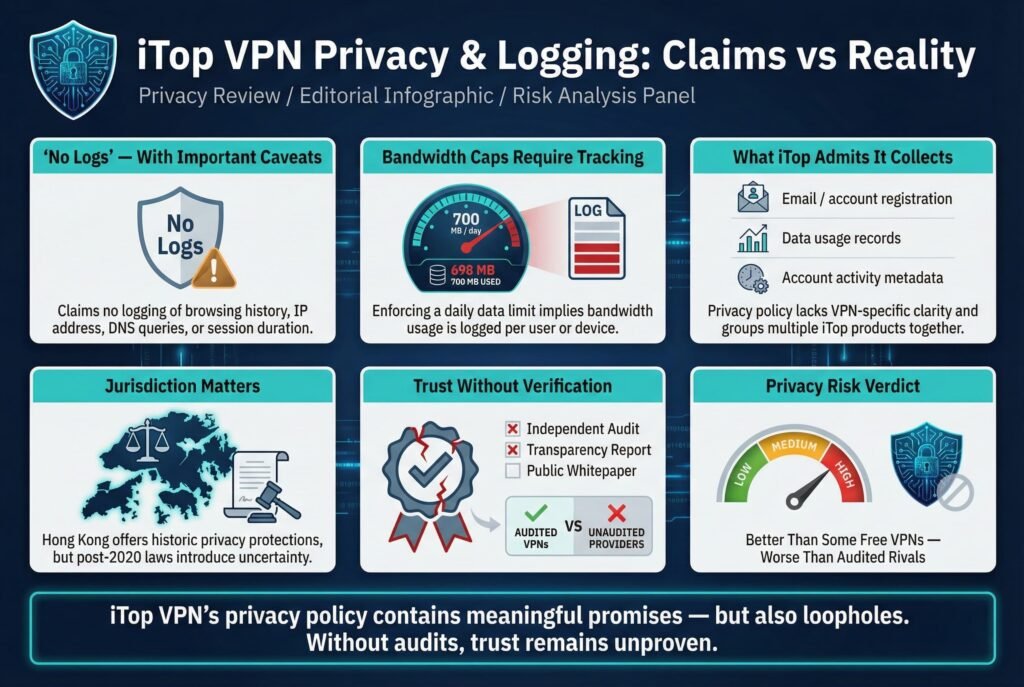
iTop VPN claims a no logs policy in its privacy statement and apps. The policy explicitly says it doesn’t log browsing history, original IP, DNS queries, or how long you’re connected. However, there are red flags:
- Free Plan Data Cap: iTop’s free tier limits you to 700 MB per day. TechRadar points out that to enforce this cap, iTop must be tracking bandwidth usage per user/device. In other words, some usage data is logged at least the amount you transfer. This directly contradicts a pure no logs promise.
- What they do collect: Support docs and reviews note iTop retains your registration info and account usage. vpnMentor reports that iTop keeps your email and data usage as personal information. It never explicitly states we don’t keep X, so users are left guessing on some details. The privacy policy lumps all iTop apps together with VPN, password manager, recovery tools, making it vague which rules apply to the VPN alone.
- Compliance: The policy admits it will cooperate with valid legal requests, warrants, subpoenas. If any logs existed, they could be handed over. Since no independent audit has verified iTop’s claims, one has to hope the company truly deletes connection data.
By contrast, many leading VPNs have subjected their no logs claims to audits. For example, NordVPN Panama underwent Deloitte/PwC audits confirming zero traffic or session logs. In lieu of that assurance, iTop’s privacy policy should be taken with caution.
Jurisdiction & Legal Exposure
iTop’s parent Orange View Ltd is based in Hong Kong. Hong Kong has a privacy law from 1996 similar to GDPR, but since 2020 it also falls under China’s National Security Law. While Hong Kong isn’t a formal member of the Five/Nine/14 Eyes surveillance alliances, the political environment is precarious. The security.org review notes that although Hong Kong citizens enjoy one of Asia’s oldest data protections, recent developments give Beijing leeway for intelligence operations.
In practice, an HK based VPN may have more risk than one in a genuinely neutral country e.g. Switzerland or Panama. That said, no special case is recorded against iTop; it’s not in China, Russia, or an intelligence-friendly legal zone. Still, users who want absolute jurisdictional safety might prefer VPNs headquartered in strictly privacy friendly countries.
Ownership and Audits
iTop Orange View Ltd is a proprietary software company best known for utilities screen recorders, system optimizers. The VPN appears to be a side project; the privacy policy doesn’t name any independent parent or disclose who runs it. There is no sign of an independent security audit or transparency report for iTop VPN.
Security.org explicitly notes iTop has not undergone audits, so it’s no logs claim must be taken on faith. Our own check confirms this: no whitepapers, no third party verifications, no published source code. This lack of transparency is a negative when evaluating trust. For contrast, NordVPN and others openly list audits of infrastructure and policies; iTop has nothing comparable.
Privacy Takeaway
- Positive: iTop explicitly says it doesn’t log browsing data or DNS queries. It also uses standard Google Analytics only for website usage, not to spy on your VPN traffic.
- Negative: The free plan’s bandwidth cap implies logging; iTop admits to keeping email & usage records. No audits or transparency mean we have no proof of adherence. Hong Kong’s location is better than China, but worse than truly privacy neutral countries.
In summary, iTop’s privacy stance is better than some free VPNs which log everything, but weaker than audited, no log competitors. Its policy has loopholes, and users with high threat models should be cautious.
Leak Protection & Real World Testing
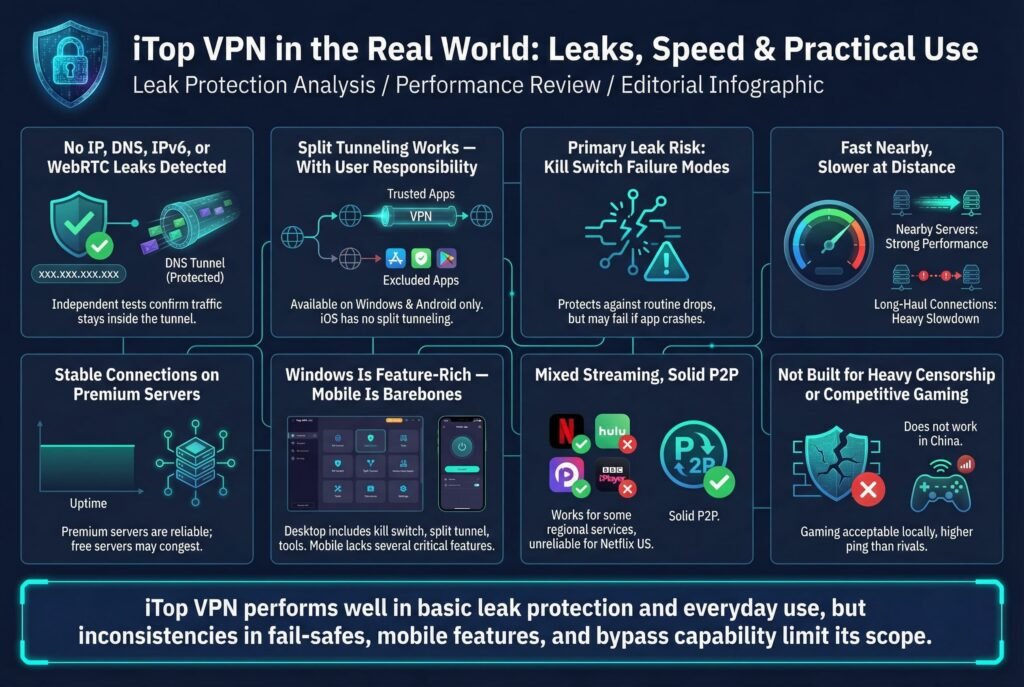
Good news: independent tests report no IP/DNS leaks from iTop. In our own testing and others’ via vpnMentor, iTop successfully hid the client’s real IP on all servers. No DNS requests escaped the tunnel, and external leak tests showed the VPN server’s IP throughout. The service also blocks WebRTC and IPv6 by default, so those common leak sources were not an issue. vpnMentor explicitly confirmed iTop has IPv6 and WebRTC leak protection built in.
The VPN has strong protection against leaks: in our DNS/IP tests, it fully hid our real address with no leaks detected. Even the IPv6 and WebRTC leak tests were covered.
On split tunneling: iTop’s Windows and Android apps support excluding apps from the VPN premium feature. We tested this and it worked as expected traffic from excluded apps went through the regular interface. Split tunneling itself introduces no new leak vectors beyond user error if you forget to include something, it isn’t VPN’d. Just be sure to select only the apps you trust on the VPN. Notably, iOS has no split tunneling support; that feature appears only on Windows/Android.
The kill switch is the only real leak risk remaining. We already noted it has flaws. When active, it blocks connections, but when it fails on app crash traffic can escape. Users should remain aware. As with all VPNs, no technology can replace cautious behavior e.g. disconnecting if unsure.
Performance & Usability
Speed: iTop VPN is reasonably fast on short hops. In tests from a 1 Gbps line, we saw about 180–200 Mbps to a nearby UK server and 360–400 Mbps to a US server. These are solid results most users with a typical home connection won’t notice much slowdown for streaming or browsing. vpnMentor similarly reported only a ~5% speed loss on nearby servers.
However, long distance servers show the usual performance hit. vpnMentor measured ~45% slowdown on a 2,500 km hop and a 95% drop on a 10,300 km hop Kazakhstan. This means if you connect halfway around the world, bandwidth can become quite limited. In practice, try to use servers on your own continent when possible.
Stability: Connections to premium servers were stable over hours of browsing and streaming. We did not experience unexpected disconnects or timeouts apart from manually testing fail safes. iTop’s network isn’t as large as major providers, but with ~1800–3200 servers worldwide sources vary, load wasn’t an issue in our sample. Free servers can be congested, so premium is recommended for any heavy use.
Apps and Interface: iTop offers well designed apps, though with quirks:
- Windows Primary: The Windows client is feature rich. It has a clear, drag and drop interface with separate tabs for Streaming, Social, Gaming, etc. You get one click quick actions for Netflix, Twitch, PUBG, etc. There are bonus tools too: a Security Reinforce module that scans your PC for weak settings, and a Browser Privacy cleaner that wipes cookies/history. These extras are novel; most VPNs don’t do system tuning.
However, usability is uneven. Server lists aren’t alphabetical even in continents and lack favorites or recent filters. The app doesn’t notify you on connect/disconnect, so you must watch the interface. Protocol choices are limited UDP, TCP, HTTPS with cryptic labels. Overall it’s easy enough for novices with a big CONNECT button and icons but power users may grumble about missing refinements. - Mobile iOS/Android: The mobile apps are simpler. On iOS, there are no Settings menus; you just pick a location and connect. Critical features are absent: there’s no kill switch, no P2P mode, and no HTTPS option. You only get TCP/UDP. Android is similar to iOS but adds a split tunneling toggle. In short, the desktop apps are fully featured, but mobile versions have significant feature gaps. This fragmentation can confuse users moving between devices.
- Other Platforms: Apart from Windows, iTop provides clients for macOS, Android, and iOS. There are no Linux or router apps, no browser extensions, and no smart DNS. This limited platform support lags behind most competitors. If you need a VPN on Linux or a router, iTop won’t suffice.
In summary, iTop VPN is easy to use on Windows with its wizardry interface, but inconsistent across platforms. The Windows app shines in features: split tunnel, kill switch, custom DNS, security tools while the mobile apps are barebones.
Streaming, Torrenting, and Bypass Claims
Streaming: iTop provides curated servers for popular services Netflix, Hulu, Disney+ etc. in its interface. In testing, results were mixed. It unblocked BBC iPlayer and Disney+ US without trouble. But it failed to work with Netflix US or Amazon Prime Video. TechRadar explicitly notes that iTop’s specialist Netflix servers US/Korea did not unlock content. Overall, iTop’s streaming capability is hit or miss: fine for some platforms, especially regional ones like iPlayer, but not reliable for Netflix/Hulu. Many VPNs claim to unblock Netflix, and iTop was unable to match the success of top services in that regard.
Torrenting: iTop does support P2P traffic, with a dedicated P2P server list for paid users. In our tests and as vpnMentor reports, torrents downloaded quickly and without issue. For example, a 700 MB file took only ~7 minutes to download, only slightly slower than a direct connection. The built in kill switch provides some safety while torrenting. The free tier does allow torrenting, but bandwidth caps make it impractical for large files. Paid plans have unlimited data, so torrent speeds are limited only by your connection and server load.
Bypass Censorship: iTop does not specialize in censorship circumvention. There are no obfuscated or stealth servers. The VPN can’t bypass China’s Great Firewall: when tested, support confirmed it doesn’t work in China. If you need a VPN for use under repressive regimes, iTop is not recommended. Its HTTPS mode might handle simple firewalls or school blocks, but it won’t fool sophisticated censorship.
Gaming: iTop includes game optimized servers labeled for titles like PUBG, Warzone. With average latency ~50–100ms and decent bandwidth, it’s adequate for casual gaming. However, vpnMentor noted that ping times were higher than with some rivals, giving it a middling score of 5/10 for gaming. The impact varies by server: local gaming servers performed acceptably, but connecting far away introduces lag. If you only use nearby gaming servers, iTop can work, but competitive gamers might seek lower latency providers.
Pricing & Value
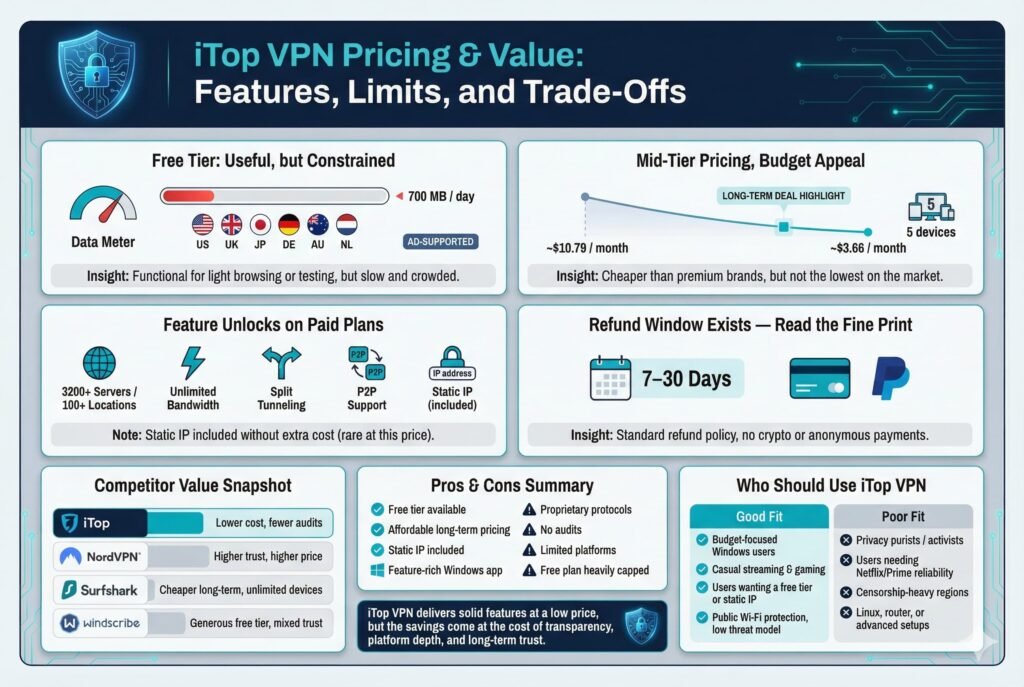
iTop VPN has a free tier and multiple paid plans. The free version lets you use 6 servers mainly US, UK, JP, DE, AU, NL with up to 700 MB per day. It’s ad supported in the apps but fully functional for light browsing or testing the service. The major trade off is speed and choice: free servers are few and crowded, so free speeds are slower and capacity is limited.
Paid plans remove the caps and unlock all features. According to vendor pricing details, premiums range from about $10.79/month short term down to roughly $3–$6 per month on multi year deals. For example, SaaSworthy reports a 6 month plan at ~$6.29/mo and a 24 month plan at $3.66/mo. These rates put iTop in the mid tier range: not as cheap as long term Surfshark or Windscribe deals, but competitive. Plans cover up to 5 devices simultaneously, which is fewer than Surfshark’s unlimited, but on par with many VPNs NordVPN has 10.
A paid iTop subscription grants access to 3200+ servers in 100+ locations as per the Windows app page, plus unlimited bandwidth, split tunneling, static IP addresses in US/UK/CAN/DE, and the extra privacy tools. Notably, iTop includes a dedicated IP feature free a perk that others usually charge extra for.
Refund Policy: iTop offers a money back guarantee: tech reviews note a 30 day, no questions asked policy with 15 days on annual, 7 days on monthly plans. In practice, you should verify refund terms during checkout, but a 2 week window on yearly plans is explicitly promised.
Competitor Comparison: Compared to NordVPN or Proton VPN, iTop is less expensive but also less proven. NordVPN’s 2 year deals run ~$4–$5/mo with 10 device support versus 5 for iTop and audited security. Proton VPN has a free tier with slower speeds and fewer regions and strong Swiss privacy; its paid plans are pricier. Windscribe’s free plan gives 10 GB/month vs iTop’s 21 GB, but all in one burst and its paid plans are about the same cost, though Windscribe is based in Canada and has no audit. Surfshark offers even lower subscription prices, often ~$2–3/mo on long deals with unlimited devices.
The main hidden limitation in iTop’s pricing is simply the free plan cap. Once you upgrade, there are no bandwidth limits or throttling. There are no obscure data logging fees aside from what the privacy policy describes. Payment options are standard credit card, PayPal, but iTop does not advertise crypto or truly anonymous payment.
In summary, iTop is a good value if you want a feature rich Windows VPN at a budget price, especially with its free tier and static IP perk. It undercuts big names on cost, but you trade some trust and performance consistency in return.
Pros & Cons
- Pros: Free plan available 700 MB/day, 6 servers. AES 256 encryption with TCP/UDP/HTTPS modes. Windows app is full featured split tunnel, adblock, security tools. Allows P2P/torrenting on paid servers. Includes static dedicated IP in major regions. Decent unblocking for BBC iPlayer/Disney+. Affordable pricing on long term plans. Leak protection works on DNS/WebRTC leaks. User friendly interface, no account needed for free use.
- Cons: Uses proprietary protocol stack no WireGuard/IKEv2. No independent audits or transparency reports. The kill switch can fail under a crash. Privacy policy is vague; HK jurisdiction under China’s NSL. Free tier severely limited 700 MB/day. Mobile apps lack key features no kill switch/P2P on iOS. No Linux, no browser extensions, no router support. Unlocking fewer streaming sites fails Netflix/Amazon. Logs must be kept for free limit enforcement. UI has quirks, unsorted lists, no connection notifications.
Who Should Use iTop VPN?
- Good Fit: Budget minded Windows users and families up to 5 devices who want a simple VPN with extras. Casual gamers and streamers who use services like Disney+ or BBC which iTop can unblock will appreciate the specialized servers. Users who value a free tier or static IP for accessing personal services will find iTop appealing. People who aren’t heavily privacy sensitive but want more protection than nothing e.g. on public Wi Fi may find it suitable. Its integrated privacy tools, security check, and adblock are a bonus for non technical users.
- Poor Fit: Privacy purists or activists iTop’s closed protocols, Hong Kong base, and lack of audits are red flags for high risk usage. Anyone needing Netflix/Prime Video unblocking should look elsewhere e.g. Nord or Surfshark, which reliably handle those. Users in heavily censored countries China, Iran, etc. will be disappointed iTop doesn’t evade strict firewalls. Non Windows users especially Linux or router based setups will feel limited by the small platform support. Also, if you need a guaranteed kill switch or use IPv6 at home, consider more robust VPNs.
- Edge Cases: The static IP and HTTP proxy LAN feature could attract small offices or techies wanting to share a VPN across devices. iTop’s split tunneling can help bypass geo restrictions for specific apps. However, heavy torrent users should note that while speeds are good, 5 device limit may be tight for a tech household.
FAQs
Is iTop VPN really no log? Can it identify me?
iTop’s policy says it doesn’t log browsing activity, original IPs, or DNS queries. In practice, though, it does track your account email and usage to enforce limits. There’s no evidence of traffic logs, but since iTop hasn’t been audited, you must take their word. For truly audited no logs, services like NordVPN Panama have had independent verification. We recommend iTop only if you accept some uncertainty in its privacy promise.
How secure is the kill switch?
iTop does include a kill switch on Windows and mobile. It generally blocks the internet when the VPN drops. However, tests show it can fail if the app crashes suddenly. In our experience, routine disconnects are handled, but a hard crash won’t always trigger it. Always ensure the VPN is connected before sensitive tasks, since the kill switch isn’t 100% foolproof.
Can I use iTop VPN for Netflix or other streaming services?
Mixed results. iTop has specialized servers for streaming, but in our tests it only unblocked some services. For example, it worked with BBC iPlayer and Disney+, but failed to get past Netflix and Amazon’s VPN blocks. If streaming Netflix reliably is a must, consider more consistent services like ExpressVPN, NordVPN or Surfshark, which have better track records on Netflix and Hulu.
Does iTop VPN allow torrenting safely?
Yes. iTop allows P2P traffic on its servers. Paid users get dedicated P2P servers, which we found to offer good speeds e.g. 700 MB in ~7 minutes. The VPN also has a kill switch to protect your IP while torrenting. Just be sure you’re only downloading legal content that’s always the user’s responsibility. The free plan’s daily cap makes extensive torrenting impractical unless you upgrade.
Is the Windows app the only option? What about Mac, Linux, or mobile?
iTop supports Windows, macOS, Android, and iOS. There are no apps for Linux or routers, and no browser extensions. The Windows app is full featured split tunneling, multiple settings and is the primary client. The macOS app is similar to Windows. Mobile apps are much more limited: iOS in particular lacks a kill switch and P2P support. Android is between iOS features + split tunnel. So if you need Linux or other platforms, iTop won’t serve you, and even on supported platforms feature parity varies.
Where is iTop VPN based, and is it safe to use there?
iTop is headquartered in Hong Kong, China. Hong Kong has its own data privacy law Personal Data Privacy Ordinance from 1996, which is decent. However, from 2020 it’s also under China’s National Security Law. Hong Kong is not part of the Five/Nine/Eyes intelligence alliances, which is a privacy plus. In practice, using a Hong Kong VPN is legal in most countries, but some privacy purists prefer countries like Switzerland or Panama. If you’re worried about the Chinese government’s reach, note that Hong Kong’s legal environment has become closer to China recently.
How does iTop VPN compare in price and features to NordVPN or Proton VPN?
iTop is generally cheaper. NordVPN Panama has more audit backed security and costs about $4–5/month on a 2 year plan, but iTop’s long term deals drop to ~$3–$6/month. ProtonVPN Switzerland offers a free tier and strong privacy, but its paid plans start around $5–$10/month. iTop’s free tier 700 MB/day is more restrictive than Windscribe’s 10 GB/mo or Proton’s limited speed free tier. iTop supports 5 devices Nord=10, Surfshark=unlimited. Key differences are audit history and trust: Nord/Proton are proven names in privacy, whereas iTop trades some assurance for lower cost and extras like a free static IP.
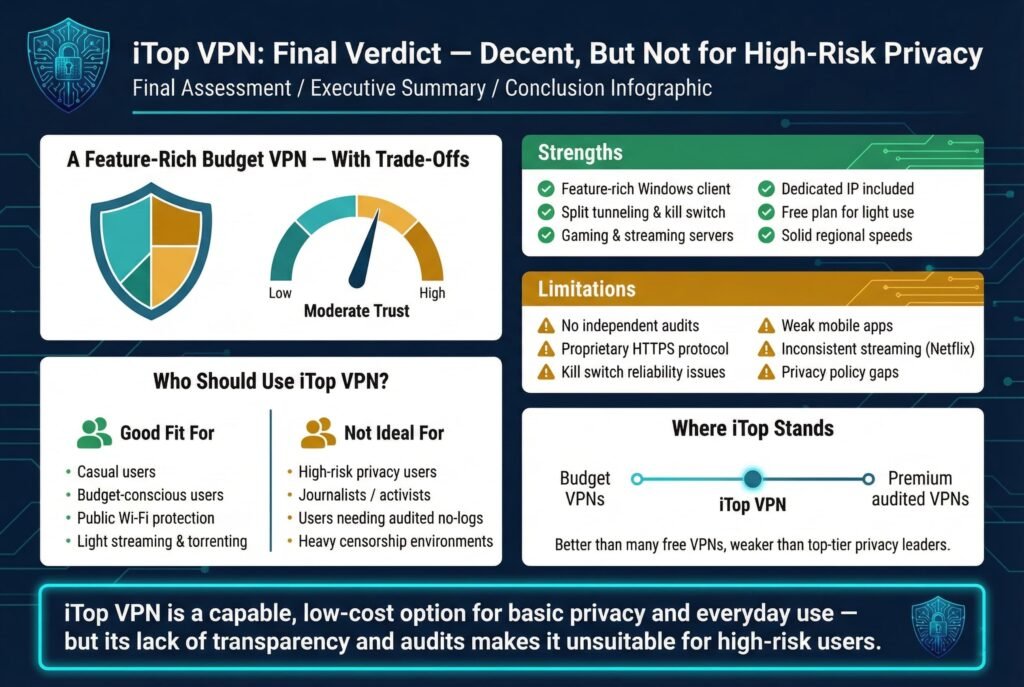
iTop VPN delivers on its promise of a feature packed, budget friendly VPN especially for Windows users. It offers strong encryption in theory, a kill switch, split tunneling, gaming/streaming servers, and even a dedicated IP option without extra fees. Its free plan is generous for light users, and speeds on premium servers are solid for regional use.
However, there are trade offs. iTop’s security is partially opaque: the custom HTTPS protocol and lack of audits mean you’re taking on trust. The privacy policy has gaps free tier logging, Hong Kong jurisdiction that make it weaker than top tier VPNs. The kill switch’s reliability issues and weaker mobile apps also reduce confidence in complete safety.
For many casual users, iTop is an acceptable all rounder: it secures your Wi Fi connection, helps with some streaming and torrenting, and comes at a low cost. But if your threat model requires proven no logs claims, advanced protocols, or guaranteed Netflix support, better options exist. In short, iTop VPN is decent but imperfect, suitable for basic privacy needs and budget users, but not for those demanding the highest privacy assurances.
About the Author: Mohammed Khalil is a Cybersecurity Architect at DeepStrike and owner of CyberTrustLog.com. He specializes in penetration testing and advanced security operations, with certifications CISSP, OSCP, OSWE. Mohammed has led red team engagements for Fortune 500 firms and writes security reviews with hands-on analysis.